Consistent AI characters
across every shot and engine.
Cast locks a brand or character identity once — a real, authorized actor or a stylized character — and holds it across every engine, shot, and cutdown. The face your client approves in the boards is the face in the final master.
Identity that holds by design, not by luck
Character consistency on VisionX isn’t a prompting trick. It’s an identity system — verified, guarded, and enforced before a single VX is spent.
A brand-locked identity
A Cast member is a real, authorized actor or a stylized character, held in an org-scoped roster — the Cast belongs to the studio, and only its members generate with it.
Consent, recorded per actor
A real person verifies themselves through a recorded face-validation consent flow — a liveness check on their own phone via QR link — before the identity can generate a single frame. That trail is what makes the output commercially usable.
Identity lives in the roster
A Cast reference resolves to the member’s verified assets at generate time. The identity a shot renders is the one the roster holds — not whatever URL happened to be in the prompt.
Characters without an actor
Paste or upload reference art, or generate a character in one click — a mascot or stylized spokesperson with no real person behind it. Same roster, same guard, same @-mention.
Face-match galleries
Every Cast member carries a primary portrait and a face-matched photo gallery. Every upload is checked against the verified actor — wrong-face and multi-face images are rejected before they can pollute the reference set.
@-mention, resolved server-side
Write @Aryan into the prompt and the platform resolves the identity server-side — the prompt itself never carries a face. Same mention, same character, whichever engine takes the shot.
Five layers between your brand and drift
Each layer locks a different surface of the identity. Together they’re why the face in shot 42 matches the face in shot 1.
| Layer | What it locks | How it holds |
|---|---|---|
| Cast member | The face | A Cast reference resolves server-side to the member’s verified assets at generate time — the identity a shot renders is the one the roster holds. |
| Photo gallery | The reference set | A primary portrait plus a face-matched gallery — wrong-face and multi-face uploads are rejected before they can pollute the reference set. |
| Voice | The spoken identity | A cloned voice binds to the Cast member, so the character speaks with one voice in every deliverable. |
| Brand Memory | The world around the face | Reference plates, signature cinema-control keys, and the negative prompt apply in one click to shots, the composer, and templates — the Cast roster and style notes travel in the same portable bundle. |
| Consistency checker | The storyboard | A perceptual-hash pass flags identity drift across shots before the client ever sees the board. |
The consistency checker is flagged as a v1 in the product — a perceptual-hash pass that catches the drift a tired eye misses on the tenth review. It sharpens a director’s judgement; it doesn’t replace it.
An @-mention resolves to the same identity wherever Cast references run — the Seedance 2.0 production tiers, the guest video engines, and every image route (Learning and Iteration cover Cast-free drafting). Because the identity lives in your Cast rather than in any single model, an engine changing or retiring never strands the character.
Roster to rendered shot, four moves
Build the Cast member
Add a real actor or generate a stylized character. Set the primary portrait and build the gallery — face-match enforcement keeps every reference on-identity.
Record the consent
For real people, the actor completes a face-validation liveness check on their own phone via QR link. Until that consent is recorded, the identity generates nothing.
@-mention in the shot
Write the character into any prompt with an @-mention. The platform resolves the identity server-side and routes the shot to whichever engine fits.
Check the board
Before client review, the cross-shot consistency checker flags identity drift across the storyboard — so the thirtieth cutdown gets the same scrutiny as the hero spot.
One face, every deliverable.
Agencies answer to brand books. A campaign is a hero film, thirty cutdowns, a stills library, and localized versions for every market — coherence across all of it is what the client is buying.
- Included:The hero spot and all thirty cutdowns — one spokesperson, every cut.
- Included:Stills, key art, and character sheets that match the film frame for frame.
- Included:Localized versions where the same face delivers every market’s script.
- Included:Two-character scenes that hold both identities in a single frame.
- Included:Brand Memory in one click — plates, cinema-control keys, style notes, and the negative prompt travel with the Cast.
- Included:Next quarter’s brief opens with this quarter’s character — the roster belongs to the org, not to a chat thread.
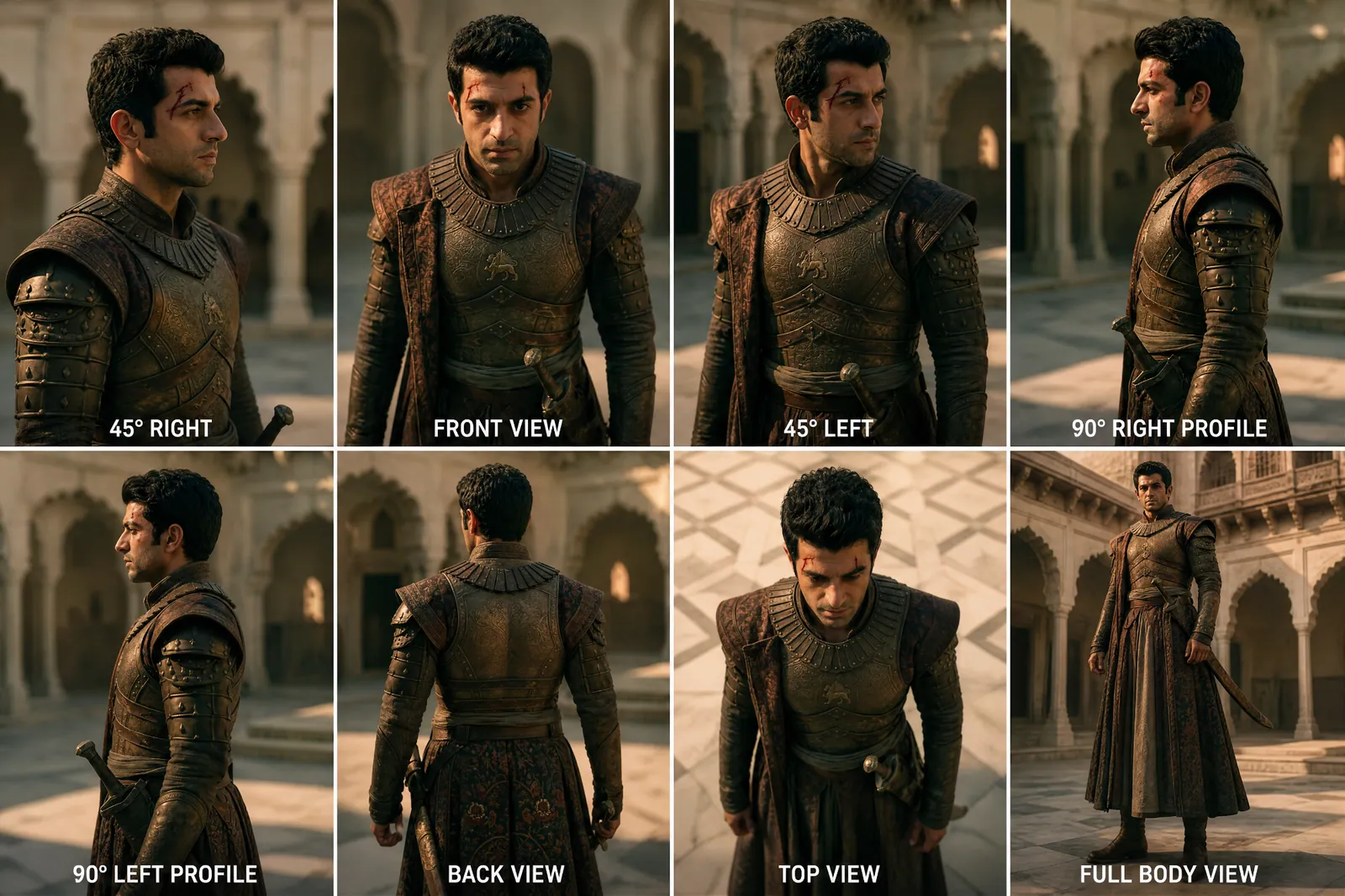

Consistent characters, answered
How does VisionX keep AI characters consistent across shots?
Can I build a consistent AI character from a real person?
Can I create a consistent character without a real actor?
Do consistent AI characters work across different engines?
Can the character keep the same voice too?
What does it cost to run a campaign on one character?
The rest of the platform
AI Video Generator
Cinema-grade video across Seedance, Sora, Veo, Kling, and Grok — one Cast, every engine.
ExploreAI Image Generator
Key art, product stills, and character sheets from GPT Image, Nano Banana, FLUX.2, Grok, and Seedream.
ExploreAI Lip Sync
Dialogue that lands on the face — sync any performance to any script, in any language.
ExploreAI Dubbing & Voice Cloning
The Audio Studio: AI dubbing, voice cloning, and text-to-speech tuned for campaign work.
ExploreAI Storyboard Generator
Board the campaign before you burn budget — beats, frames, and shot plans in minutes.
ExploreLock the face. Run the campaign.
Bind a Cast and run your first shots free — 100 VX, no card required.